India Post Delivery Scam SMS: How the Fake Address Update Link Drains Your Bank Account

Spread the love
⚡ Quick Answer & Key Takeaways
  • The SMS is Fake: India Post never sends SMS alerts asking users to update residential addresses via links or pay online redelivery fees.
  • The Threat: Tapping the link either loads a cloned phishing portal that hijacks bank OTPs or triggers an Android APK trojan that intercepts incoming 2FA SMS.
  • The Official Standard: Official India Post notifications use registered TRAI DLT headers (e.g., CP-INDPOST) and link strictly to indiapost.gov.in.
  • First Action: Never pay the ₹5 fee. If debited, dial the National Cyber Crime Helpline at 1930 immediately to freeze recipient accounts.

If your phone just pinged with a text message stating your package cannot be delivered due to an incorrect house number or missing street details, you are not alone. During peak shopping events like Flipkart’s Big Billion Days and Amazon’s Great Indian Festival, logistics networks handle upwards of 12 million shipments daily. Fraud syndicates capitalize on this volume by deploying automated smishing (SMS phishing) attacks, with the India Post delivery scam SMS leading the count.

These messages look official, convey manufactured urgency, and frequently trap buyers who have genuine orders in transit. Entering your details or paying a nominal ₹5 redelivery fee can lead to immediate bank account compromise.
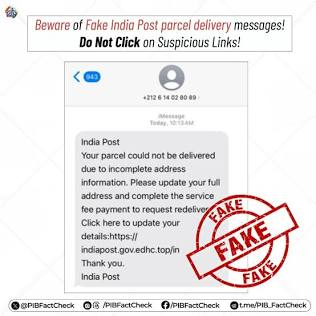
The Anatomy of the Attack: What Arrives on Your Device

Smishing campaigns use SIM farms, spoofed gateways, or compromised third-party routing infrastructure to send messages resembling this layout:

⚠️ Example: Phishing SMS Detected
From: +91 98765 43210 10-DIGIT NUMBER (FAKE)
Via SMS

[ALERT] India Post: Your parcel tracking number IN-9482104-IN could not be delivered because your address is missing a street number.

Please update your address within 24 hours to prevent parcel return:

https://indiapost.gov.in-redelivery.top/updt
Why this is dangerous: The link mimics indiapost.gov.in, but the real host domain is redelivery.top. Official India Post alerts never come from private 10-digit mobile numbers or demand online address-correction fees.

While India Post is the primary brand exploited, the same operational templates are mirrored across private carriers, generating related alerts such as a fake blue dart address update link complaint or fraudulent Ekart logistics notices.

The Fraud Vector: Phishing vs. Android Trojan

When a user taps the included link, the scam branches into two distinct exploitation methods depending on the backend infrastructure set up by the attacker.

Initial Vector 📩 Victim Receives Fake Delivery SMS with Link
▼
Path A: Phishing Gateway
  • Cloned India Post / Courier UI
  • Prompts for address + ₹5–₹25 fee
  • Real-time automated OTP relay
💥 Direct Bank Account Drain
Path B: Android Malware (.apk)
  • Direct download of sideloaded app
  • Demands SMS & Accessibility rights
  • Silently intercepts 2FA OTPs in background
📱 Device Takeover & Funds Siphoned
Both pathways require only a single tap to initiate credential theft or unauthorized device access.

1. The Spoofed Portal & Real-Time OTP Relay

The URL routes the user to a server hosted on cheap, generic top-level domains (e.g., .top, .icu, .vip, .xyz, or .cc). The site displays an interface that mimics the Department of Posts: familiar red-and-yellow color schemes, national emblems, and an active tracking window.

  1. Information Harvesting: The site requests your full name, mobile number, full residential address, and postal PIN code.
  2. The Nominal Fee: To process the “rescheduled attempt,” the portal demands a token charge between ₹5 and ₹25.
  3. The Interception Engine: When you submit your debit card credentials or UPI details, an automated script behind the scenes passes those inputs into a high-value merchant transaction (often ₹10,000 to ₹50,000) or sets up an auto-debit e-mandate.
  4. The Screen Mirror: You are shown an OTP submission screen that looks identical to a bank 3D-Secure portal. Thinking the OTP confirms a ₹5 payment, entering the code authorizes the attacker’s high-value transaction instead.

2. The Sideloaded .apk Payload (Android Trojan)

In several variants, tapping the link initiates an automatic download of an application package file, such as IndiaPost_Service.apk or Postal_Tracker.apk.

  • The browser warns that the file may be harmful, but the accompanying page instructs the victim to bypass Android’s security warnings.
  • Once installed, the malicious package requests RECEIVE_SMS, READ_SMS, and Accessibility Service permissions.
  • With accessibility granted, the malware can inspect UI elements, interact with device settings, and grant itself further privileges without user prompts.
  • When financial fraud is initiated against the victim’s accounts, the application silently intercepts incoming banking verification OTPs, suppresses notification alerts, and forwards the credentials to an external server or Telegram bot.
Instant Scam Verification

Received a Suspicious Link or Courier SMS?

Do not tap unverified URLs. Run any website link, APK download, or parcel alert through our threat database first.

🔍
🛡️ 100% Free & Anonymous ⚡ Real-Time Check
Open Full Scam Checker »

Genuine Postal Protocols vs. Fraudulent SMS Traps

Legitimate logistics carriers adhere to strict operational guidelines under India’s commercial communication framework. Comparing these logistics standards helps verify whether an alert is real.

Operational IndicatorFraudulent “India Post” SMSAuthentic Logistics Providers (India Post, Blue Dart, Delhivery)
Sender ID / HeaderStandard 10-digit mobile number (+91 9xxxx xxxxx) or international country code (+63, +84, +1)Registered DLT alphanumeric header conforming to TRAI guidelines (e.g., AD-INDPOST, BP-BLDART, VK-EKART)
Domain ArchitectureUses external extensions: indiapost-update.top, indiapost.gov.in.services-in.ccExclusively hosted on the official national portal: indiapost.gov.in
Fee StructureDemands a ₹5 to ₹25 payment to re-deliver or avoid warehouse returnsNo fee. Address corrections and standard re-attempts carry zero online processing charges
Delivery WorkflowThreatens immediate return within 12–24 hoursCarriers mandate 3 independent physical attempts across 48 to 72 hours before initiating Return to Origin (RTO)

4 Technical Rules to Avoid Delivery Phishing

1. Verify Directly Inside Originating Marketplaces

If you purchased items through Amazon, Flipkart, or a direct-to-consumer store, never rely on third-party SMS alerts to monitor transit. Go to your active app, open Your Orders, and check the status directly. If an address issue or delivery failure actually occurred, the merchant platform will display the update and allow modifications directly inside its secured environment.

2. Verify TRAI DLT Headers

Under the Telecom Regulatory Authority of India (TRAI) guidelines, all commercial and transactional SMS messages must be dispatched through Distributed Ledger Technology (DLT) platforms with authorized headers.

  • Legitimate commercial headers contain a prefix denoting the access provider and service area, followed by a hyphen and a registered 6-character sender ID (e.g., CP-INDPOST).
  • If a delivery failure notification arrives from a standard 10-digit personal phone number, it has bypassed corporate compliance and is unauthorized.

3. Parse the Domain Name Hierarchy

Scammers often embed legitimate brand names as subdomains within a third-party root domain to mislead users reading quickly on mobile displays.

  • Look at the final part of the web address immediately preceding the first single forward slash (/).
  • In the string [https://indiapost.gov.in.reschedule-parcel.top/login](https://indiapost.gov.in.reschedule-parcel.top/login), the actual domain is reschedule-parcel.top.
  • The true official website for India Post tracking is strictly:[https://www.indiapost.gov.in](https://www.indiapost.gov.in)

4. Keep Android Unknown App Installations Disabled

Prevent mobile malware payloads from executing by ensuring sideloading permissions remain off. Check your device:

Settings → Apps → Special App Access → Install Unknown Apps

Verify that Google Chrome, WhatsApp, Telegram, and your local file manager are marked as “Not Allowed”.

Incident Response: What to Do If You Clicked or Paid

If you submitted financial information or downloaded an unknown file, fast containment during the initial window is essential for fund recovery.

Step 1: Disconnect and Sanitize Your Device

  1. If an .apk file was installed, enable Airplane Mode immediately to cut mobile data and Wi-Fi connections.
  2. Go to Settings → Apps → All Apps. Look for suspicious entries with generic labels (such as Service, Update, Tracking, or blank names).
  3. If the Uninstall button is grayed out, navigate to Settings → Security → Device Admin Apps, revoke permissions for the suspicious tool, and proceed with removal.

Step 2: Implement Financial Freezes

  • Access your online banking from an alternate device or call your bank’s emergency hotline to permanently block the compromised debit or credit card.
  • Reset your primary UPI application PINs (Google Pay, PhonePe, Paytm).
  • Request a temporary block on internet banking services if account credentials were submitted on the phishing page.

Step 3: Dial 1930 for the National Cyber Crime Network

The Ministry of Home Affairs operates the National Cyber Crime Helpline: 1930 (formerly known as the Citizen Financial Cyber Fraud Reporting and Management System or CFCFRMS).

  • Call 1930 immediately.
  • Provide the operator with your full name, phone number, bank name, account number, transaction timestamp, and the 12-digit UPI Transaction ID or Bank Reference Number (UTR / RRN).
  • The 1930 infrastructure works alongside major Indian banks, card payment gateways, and wallet providers. It can trigger an inter-bank alert to freeze the fund transfer path across downstream beneficiary accounts before cash is withdrawn at an ATM or moved into mule wallets.

Critical Details Required for Calling 1930 (CFCFRMS)

When reporting financial loss to the 1930 National Cyber Crime Reporting Helpline, speed is paramount. Have these 5 specific data points written down before calling so the operator can immediately initiate an inter-bank freeze across the recipient mule accounts:

  1. Victim Account Details: Your full name, bank name, account number, and debit card number (last 4 digits).
  2. Transaction Timestamp: The exact date, hour, and minute the money was debited (as stated in your official bank debit alert SMS).
  3. Exact Amount Debited: The precise amount in Rupees (e.g., ₹24,999, not “around 25 thousand”).
  4. The 12-Digit Reference Number (UTR / RRN): The Unique Transaction Reference (UTR) for NEFT/RTGS/IMPS or the Retrieval Reference Number (RRN) found inside your UPI app or bank statement.
  5. Recipient Identifiers (If Available): The receiver UPI ID (VPA), merchant name, or beneficiary account number shown in your transaction receipt.

Copy-Paste Email Template for Bank Nodal Grievance Officer (RBI 72-Hour Notice)

Important: To preserve your Zero-Liability rights under RBI circular RBI/2017-18/15 DBR.No.Leg.BC.78/09.07.005/2017-18, you must officially notify your bank in writing within 3 working days of the unauthorized transaction.

Copy, fill out the brackets, and email this directly to your bank’s customer care and Principal Nodal Officer:

🚨 Fast-Response Protocol

5 Details Required Before Calling 1930 (CFCFRMS)

Speed is critical to freeze beneficiary mule accounts. Write these 5 points down before dialing the National Cyber Helpline:

1 Account Credentials: Full name, bank name, account number, and debit card (last 4 digits).
2 Exact Timestamp: The exact date, hour, and minute stated in your bank’s debit alert SMS.
3 Exact Amount Debited: Precise figure in Rupees (e.g., ₹24,999, not an estimate).
4 12-Digit Reference Number: The UTR (IMPS/NEFT) or RRN / UPI Reference Number from your bank app.
5 Recipient Identifiers: Recipient UPI ID (VPA), merchant name, or beneficiary account if shown.

Bank Dispute Letter (RBI 72-Hour Notice)

Preserve zero-liability rights under circular RBI/2017-18/15.
Subject: URGENT: Notification of Unauthorized Electronic Banking Transaction – Account No. [Your Account Number]To, The Branch Manager / Principal Nodal Officer, [Your Bank Name] [Branch Name / City]Dear Sir/Madam,I am writing to formally report an unauthorized electronic debit transaction on my account resulting from a third-party cyber fraud / smishing incident.In accordance with the Reserve Bank of India (RBI) circular on “Customer Protection – Limiting Liability of Customers in Unauthorised Electronic Banking Transactions” (Ref: RBI/2017-18/15 DBR.No.Leg.BC.78/09.07.005/2017-18), I am notifying the bank within 3 working days of the occurrence to claim zero liability.Transaction Details: – Account Holder Name: [Your Full Name as per Bank Records] – Account / Card Number: [Your Account Number or Last 4 Digits of Card] – Registered Mobile Number: [Your Mobile Number] – Date and Time of Transaction: [DD/MM/YYYY at HH:MM AM/PM] – Disputed Transaction Amount: ₹[Amount Debited] – Transaction Reference Number (UTR / RRN / UPI Ref ID): [12-Digit Reference Number] – Merchant / Recipient Details (if shown): [Receiver UPI ID or Account Name]Actions Taken: 1. I have blocked the compromised card / internet banking / UPI facility on [Date & Time]. 2. A formal complaint has been registered with the National Cyber Crime Reporting Portal under Acknowledgement Number: [Your Cyber Crime Acknowledgement Number].Under paragraph 6 of the aforementioned RBI circular, customers are entitled to zero liability where the unauthorized transaction occurs due to third-party breach and the customer notifies the bank within three working days of receiving the communication.I request you to immediately reverse the disputed amount and provide a shadow/provisional credit within 10 working days as mandated under paragraph 9 of the circular.Attached: 1. Bank SMS alert screenshot 2. Cyber Crime Portal acknowledgement slip (PDF/Image) 3. Phishing SMS screenshotSincerely, [Your Full Name] [Your Contact Number] [Your Address]
⏱️ Statutory Deadline: Submit this via registered email to your bank’s Nodal Officer within 72 hours (3 working days) of the debit SMS to guarantee Zero Customer Liability protection.
`); printWindow.document.close(); printWindow.focus(); setTimeout(() => { printWindow.print(); printWindow.close(); }, 350); }

Step 4: File Official Documentation at Cybercrime.gov.in

  • Visit the national reporting portal at cybercrime.gov.in and file a detailed complaint under Financial Fraud.
  • Attach all primary evidence: full-resolution screenshots of the SMS, the sender’s phone number or header, the full URL string, and your bank statement showing the unauthorized debit.
  • Download and save the final Cyber Crime Acknowledgement Slip (PDF) containing your official complaint registration number.

Recovering Funds: RBI Zero-Liability Framework

Under the Reserve Bank of India (RBI) circular on Customer Protection – Limiting Liability of Customers in Unauthorised Electronic Banking Transactions (RBI/2017-18/15 DBR.No.Leg.BC.78/09.07.005/2017-18):

Trigger Event 🚨 Unauthorized Electronic Debit Detected
▼
Reported Within 3 Working Days
  • 100% Zero Liability: The customer bears no loss for third-party fraud.
  • Bank must reverse and credit funds back within 10 working days.
✅ Full Refund Entitlement
Reported in 4 to 7 Working Days
Maximum Customer Liability Capped:
  • BSBD (Basic Savings) Accounts: Max ₹5,000
  • Savings Accounts / Credit Limit ≤ ₹5 Lakh: Max ₹10,000
⚠️ Partial Capped Liability
Source: Reserve Bank of India (RBI) Circular on Limiting Liability of Customers in Unauthorised Electronic Banking Transactions. Reporting beyond 7 working days defaults liability resolution to the individual bank’s board-approved policy.
  • Zero Liability (Reported within 3 working days): If an unauthorized transaction occurs through third-party breach or phishing where you report the incident to your bank within three working days of receiving the SMS alert, your maximum liability remains zero.
  • Limited Liability (Reported within 4 to 7 working days): If reporting occurs between four and seven working days, your personal liability is capped based on account tier:
    • Basic Savings Bank Deposit (BSBD) accounts: Maximum liability of ₹5,000.
    • Other savings accounts, prepaid instruments, and credit cards with limits up to ₹5,00,000: Maximum liability of ₹10,000.
  • Resolution Timeline: The bank must credit the disputed amount back to your account within 10 working days from the notification date, subject to an official complaint copy (your 1930 / cybercrime.gov.in acknowledgement).

Frequently Asked Questions

Does India Post ever contact customers via SMS for address updates?

India Post does not send SMS messages requiring users to update physical addresses via external web links or pay re-delivery charges online. Official tracking inquiries are handled through local post offices or by manually entering a registered tracking number directly at indiapost.gov.in.

Can entering only my address compromise my bank account?

Entering your address on its own exposes your personal data to spam syndicates and targeted identity profiling, but it cannot directly withdraw funds from your bank. Financial loss occurs when victims complete the secondary payment step, which routes their card credentials, CVV, or UPI PIN into unauthorized transactions.

What should I do if a delivery agent calls asking for an OTP before arrival?

Never share an OTP over the phone before physical delivery. Delivery authentication codes are designed to be shared only after you have confirmed the package is in your possession. In the case of Open-Box Deliveries (OBD), share the code only after the outer seal is cut and the physical product inside is verified.

Does India Post ask for address update through SMS?

No. India Post never sends SMS messages asking customers to click links or enter personal information to update a delivery address. All official parcel tracking and status updates are managed strictly through the official national portal at indiapost.gov.in or directly at local post offices using a valid consignment number.

Why did I receive an India Post delivery failed update address within 24 hours link?

That message is an automated “smishing” (SMS phishing) scam, not a real delivery alert. Fraudsters blast thousands of these messages during festival sales, betting that you have an order in transit. The 24-hour deadline is manufactured urgency designed to rush you into tapping an unverified link before checking your real orders.

Why have I received an SMS from India Post asking for a ₹5 redelivery fee?

India Post does not charge online re-attempt or redelivery fees. Scammers use a tiny ₹5 to ₹25 fee as psychological bait: because the amount is negligible, victims enter debit card numbers, UPI PINs, or net banking details without suspicion. Once entered, the backend script attempts a high-value debit (often ₹10,000 to ₹50,000) using the OTP you provide.

How do I identify a fake Blue Dart courier failed address update SMS?

Check the sender ID and the website domain. Genuine Blue Dart notifications arrive from registered TRAI DLT alphanumeric headers (such as BP-BLDART or VD-BLDART), never from personal 10-digit mobile numbers (+91 9xxxx xxxxx). Furthermore, authentic Blue Dart tracking links always end in bluedart.com, whereas scam texts route to spoofed addresses using generic extensions like .top, .vip, or .site.

I clicked on a fake India Post link and entered an OTP, what to do immediately?

Take these three steps right now:

  1. Lock Your Accounts: Open your mobile banking app or call your bank’s emergency hotline to immediately block the debit card, credit card, or net banking credentials you entered.
  2. Call 1930: Dial the National Cyber Crime Reporting Portal Helpline at 1930 immediately. Provide the operator with your account details, transaction timestamp, and the 12-digit UPI reference (UTR/RRN) number so they can freeze downstream mule accounts before cash is withdrawn.
  3. Lodge an Official Complaint: Register the incident on cybercrime.gov.in with screenshots of the SMS, phishing URL, and debit alert to secure an official acknowledgement slip.

I accidentally installed an APK from a courier delivery SMS, what to do?

  1. Turn on Airplane Mode: Immediately disconnect mobile data and Wi-Fi to stop the malware from sending your incoming OTPs to the attacker’s server.
  2. Remove Device Admin Rights: Go to Settings → Security → Device Admin Apps. If a generic or postal-named app has admin privileges, revoke them.
  3. Uninstall the App: Navigate to Settings → Apps → Installed Apps, locate the downloaded file (it may have a generic Android icon, a blank name, or a label like Postal Service), and tap Uninstall. If it refuses to delete, restart the phone in Safe Mode and remove it.

What are the RBI guidelines for a refund if money is stolen through a fake delivery link?

Under the Reserve Bank of India’s zero-liability circular (DBR.No.Leg.BC.78/09.07.005/2017-18):

  • Zero Customer Liability: If you notify your bank within 3 working days of receiving the unauthorized transaction alert, you are entitled to a full refund, provided you did not intentionally share credentials and file an official complaint. The bank must reverse the funds within 10 working days.
  • Limited Liability: If reported between 4 and 7 working days, your liability is legally capped (e.g., maximum ₹5,000 for basic savings accounts, or ₹10,000 for standard savings/credit cards with limits up to ₹5 lakh). Reporting after 7 days leaves resolution to your bank’s board policy.