
Fake MyChart Text Scams: How to Spot Healthcare Smishing and Protect Your Medical Data
Quick Summary: Fake MyChart text scams are healthcare smishing attacks where cybercriminals impersonate patient portals to exploit medical urgency. Threat actors send fraudulent SMS alerts about urgent test results, canceled appointments, or unpaid bills to lure victims onto convincing spoofed login pages. Their primary goal is harvesting portal credentials, sensitive personal data, and payment details. To stay protected, users should avoid clicking unsolicited SMS links, adopt an "app-first" approach by logging in directly through official apps or verified portals, enable two-factor authentication, and verify suspicious alerts directly with their healthcare providers.Medical identity theft has entered the mobile age. Across the United States, Canada, the United Kingdom, and Australia, millions of patients rely on patient portals like Epic Systems’ MyChart to manage prescriptions, check diagnostic results, communicate with physicians, and pay medical bills.
Because healthcare communications carry high emotional weight and urgent subtext, cybercriminals are increasingly exploiting this trust. “Fake MyChart messages”—a deceptive strain of SMS phishing known as smishing—are targeting patients across Tier-1 nations.
Understanding how these fraudulent campaigns operate, recognizing their anatomical patterns, and establishing strict digital hygiene can protect you from financial loss and medical identity theft.
What Are Fake MyChart Messages?
Fake MyChart messages are fraudulent SMS notifications, emails, or direct messages engineered to impersonate legitimate healthcare systems, clinics, or hospital networks utilizing the MyChart platform.
Unlike broad, untargeted spam, healthcare smishing leverages high-authority institutional credibility. A text message claiming to come from “Your Healthcare Network” or “MyChart Health Alert” bypasses ordinary skepticism. When individuals receive an alert regarding pending lab tests, overdue balances, or canceled surgical consultations, emotional urgency often overrides caution.
The primary objective of these campaigns is straightforward:
- Harvest Portal Credentials: Steal login usernames and passwords to compromise health profiles.
- Collect Personally Identifiable Information (PII): Capture Social Security Numbers (SSN), Medicare/NHS numbers, dates of birth, and home addresses.
- Execute Payment Fraud: Direct victims to fake payment gateways to harvest credit card or bank account details under the guise of settling outstanding co-pays or balances.
How the Scam Unfolds: The Anatomy of an Attack
Healthcare smishing attacks follow a calculated, multistage lifecycle designed to minimize hesitation:
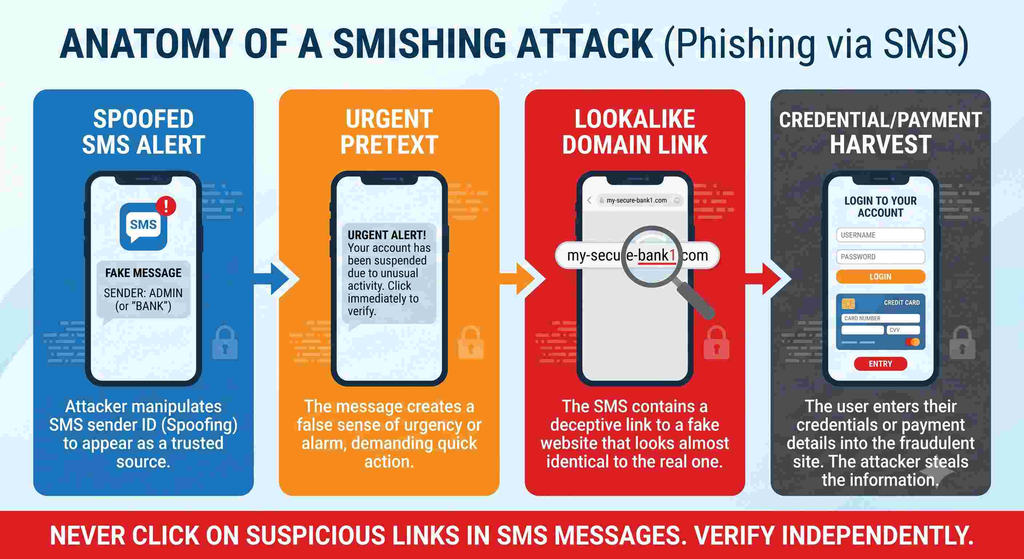
1. The Lure
The patient receives an SMS message appearing to originate from a regional health provider or generic health alert service. Threat actors often spoof local area codes or register burner VoIP numbers.
2. The Urgency Hook
The notification presents a scenario requiring immediate intervention:
- Overdue Billing Invoices: “Urgent: You have an outstanding balance of $84.20 on your MyChart account. Unpaid balances will be forwarded to collections within 24 hours. Settle now: [Link]”
- Critical Lab & Diagnostic Alerts: “New test results uploaded to your patient chart. Secure physician comments attached. View here: [Link]”
- Prescription Disruptions: “Action required: Your scheduled prescription refill could not be processed. Update insurance and verification details immediately: [Link]”
- Account Lockout Warnings: “Unauthorized access detected on your patient portal. Reset your MyChart credentials now to retain access: [Link]”
3. The Impersonation Site
Clicking the embedded link routes the user to a deceptive, typo-squatted URL (such as mychart-secure-billing[.]top or patient-mychart-login[.]net). Scammers replicate hospital color palettes, official typography, and Epic MyChart logos to present a convincing facade.
4. Data Extraction
Once the victim enters their credentials or payment card details, the data is captured directly by threat actors, while the site redirects to the genuine patient portal to conceal the intrusion.
Legitimate Portal vs. Phishing Lure: Key Differences
| Feature | Legitimate MyChart Communication | Phishing / Smishing Impersonation |
| Sender Identification | Dedicated verified 5- or 6-digit shortcodes or official hospital domain | Standard 10-digit mobile numbers, random international prefixes (+44, +63, etc.), or non-institutional webmail |
| Link Structure | Prompts users to open the mobile application or directs strictly to verified domains (e.g., *.org, *.edu, mychart.com) | Uses shortened URLs (bit.ly, tinyurl) or deceptive domains containing hyphens and generic extensions (.xyz, .info) |
| Requested Data | Authenticates solely via secure portal login; never asks for raw SSN or card PINs over text | Requests immediate verification of Social Security Numbers, insurance policy numbers, or CVV codes |
| Payment Pressure | Itemized digital billing with routine monthly statement cycles | Artificial deadlines (e.g., “Pay within 2 hours to avoid penalty”) |
The Severe Risks of Compromised Health Portals
Falling victim to a healthcare smishing lure poses risks beyond typical financial credit card fraud:
- Medical Identity Theft: If bad actors obtain your medical credentials, they can submit fraudulent insurance claims, obtain prescription drugs illegally, or alter existing health records—potentially injecting incorrect blood types or allergy profiles into your active medical chart.
- Secondary Extortion: Patient portals contain highly confidential clinical notes, treatment records, and behavioral health histories. Attackers targeting high-profile individuals or vulnerable patients may threaten exposure.
- Credential Stuffing: Because many individuals reuse passwords across platforms, a compromised MyChart password often grants entry to primary email accounts, banking profiles, and tax management portals.
Defensive Action: How to Protect Your Health Portal
Implement these standard protocols across your personal devices:
1. Adopt the “App-First” Rule
Never follow hyperlinks sent via SMS to access clinical results or billing interfaces. Instead, ignore the link entirely and launch the verified MyChart application installed directly on your smartphone, or use a saved, verified browser bookmark.
2. Enforce Two-Factor Authentication (2FA)
Access your portal’s security settings and enable multi-factor authentication. Prioritize authenticator apps (such as Google Authenticator or hardware security keys) over standard SMS-based verification codes, which can be vulnerable to SIM-swapping.
3. Verify Directly Through Official Clinic Channels
If a notification claims an appointment has been canceled or an unpaid bill is pending, contact your clinic’s administrative desk using the telephone number printed on your physical billing statement or appointment card—not any phone number listed in the text message.
What to Do if You Clicked a Suspicious Link
If you inadvertently submitted login details or financial data into a suspicious site, take immediate remediation steps:
- Change Your Credentials: Log into your real patient portal immediately and change your password. If you reuse this password elsewhere, update those accounts as well.
- Alert Your Healthcare Provider: Contact your hospital network’s Patient Privacy or Information Security office so they can flag your medical record for abnormal access attempts.
- Freeze Payment Cards: If financial details were submitted, contact your card issuer immediately to report unauthorized exposure and request a card replacement.
- Report the Attack:
- US: Forward the message to 7726 (SPAM) and submit a report to the Federal Trade Commission at ReportFraud.ftc.gov.
- UK: Forward the message to 7726 and file a report with [suspicious link removed].
- Canada: Report the event to the Canadian Anti-Fraud Centre (CAFC).
- Australia: Submit an incident report to Scamwatch.
Emergency Response Checklist: Patient Portal Phishing Incident
If you clicked a suspicious link or entered login credentials, payment details, or personal information on a fraudulent medical portal page, take these actions immediately in order of priority.
Step 1: Containment & Credential Lockdown (First 15 Minutes)
- [ ] Reset Your Patient Portal Password:
- Open your known, legitimate health portal app or visit the official hospital website via your browser (do not use the text/email link).
- Change your password to a strong, unique 16+ character passphrase.
- [ ] Terminate Active Sessions:
- Look for “Security Settings” or “Manage Devices” inside the portal and click Sign Out of All Sessions.
- [ ] Reset Reused Passwords:
- If you use that exact password for your primary email, bank, or other accounts, change them immediately.
- [ ] Turn On Multi-Factor Authentication (MFA):
- Enable two-factor verification via an authenticator app (Google Authenticator, Microsoft Authenticator) or SMS code if that is all your provider offers.
Step 2: Financial Defense (If Payment Cards or Bank Info Were Entered)
- [ ] Lock / Freeze Payment Cards:
- Open your banking or credit card app and temporarily lock the debit or credit card used.
- [ ] Call Your Bank’s Fraud Department:
- Call the number on the back of your card. Inform them that you submitted card details to a phishing site so they can cancel the card and issue a replacement.
- [ ] Review Recent Transactions:
- Check for micro-charges ($1.00 or less) used by automated fraud bots to test card validity.
Step 3: Medical Identity Protection (First 24 Hours)
- [ ] Notify the Hospital / Clinic IT Security Desk:
- Call your healthcare provider’s main administrative office and ask for the Patient Privacy Office or Information Security Team.
- Report that your account credentials may have been exposed so they can monitor for unauthorized chart access or changes.
- [ ] Verify Patient Profile & Contact Details:
- Log into your authentic portal and inspect:
- Registered phone number and email address.
- Active home/mailing address.
- Designations for healthcare proxies or authorized representatives.
- Log into your authentic portal and inspect:
- [ ] Review Treatment & Prescription Records:
- Check whether any unrequested prescription refill requests or appointment alterations were initiated.
Step 4: Credit & Identity Safeguards (If SSN / National ID Was Entered)
- [ ] Place a Free Credit Freeze:
- Contact the major consumer credit bureaus to freeze your credit file, preventing unauthorized credit lines from opening:
- US: Equifax, Experian, TransUnion
- UK: Experian, Equifax, TransUnion UK
- Canada: Equifax Canada, TransUnion Canada
- Australia: Equifax, Experian, illion
- Contact the major consumer credit bureaus to freeze your credit file, preventing unauthorized credit lines from opening:
- [ ] Set Up Fraud Alerts:
- Request a 1-year initial fraud alert on your credit profile.
Step 5: Report the Attack
- [ ] Report the Phishing Message via SMS:
- Forward the scam SMS directly to 7726 (SPAM) to flag the carrier route.
- [ ] File Official Incident Reports:
- United States: ReportFraud.ftc.gov & IC3.gov
- United Kingdom: [suspicious link removed] (0300 123 2040)
- Canada: Canadian Anti-Fraud Centre
- Australia: Scamwatch
Incident Log (Keep for Your Records)
| Field | Details |
| Date & Time of Incident: | ___________________________________________________ |
| Phone Number / Email Sender: | ___________________________________________________ |
| Phishing URL / Link Provided: | ___________________________________________________ |
| Information Entered (PW/SSN/Card): | ___________________________________________________ |
| Bank Reference / Ticket Number: | ___________________________________________________ |
| Clinic Privacy Ticket Number: | ___________________________________________________ |
Tip: Print or save this document as a PDF to keep offline access while securing your accounts.
Neutral / General Cybersecurity Byline
[Suyesh Gusain] is a cybersecurity and consumer safety writer focused on identity protection, digital fraud trends, and healthcare privacy. With a focus on threat awareness, their work breaks down complex phishing schemes into actionable defense strategies for consumers.
Every safe click counts. If this post helped, a coffee gesture fuels more scam‑busting investigations.

Call to Action
Please share this article to spread awareness. Follow us on Facebook, Twitter, and Instagram for more scam alerts. If you doubt the legitimacy of any website or investment plan, DM us on social media — we’ll help you verify.
“Scammers evolve daily. Subscribe to our scam‑alert list and stay one step ahead.”
Frequently Asked Questions (FAQ)
Does MyChart send text messages about unpaid medical bills?
Yes, legitimate healthcare systems do send SMS notifications regarding outstanding billing statements or co-pays. However, a genuine MyChart text will generally instruct you to log into the official app or your provider’s verified patient portal directly. It will never pressure you with 24-hour collection threats or demand direct payment through an unfamiliar third-party link or wire service.
Why did I get a MyChart text about test results if I don’t use MyChart?
If you have never registered for MyChart or haven’t visited a clinic recently, receiving an alert stating “Your recent test results are ready” indicates a broad smishing (SMS phishing) lure. Cybercriminals mass-broadcast generic messages to thousands of phone numbers, betting that a percentage of recipients are active patients who will reflexively click the link.
Is the “Free Medicare Health Kit” MyChart text or email a scam?
Yes. A widespread phishing campaign impersonates Epic MyChart offering a complimentary “Senior Health Package” or “Medicare Kit” in exchange for completing a short survey. The fraudulent site eventually requests personal identifying information and credit card details to cover a minor “shipping fee” (often around $10–$15), exposing your card to unauthorized charges and recurring fraud.
What happens if I clicked a fake MyChart link but didn’t enter any information?
Simply loading the page typically carries a low risk compared to submitting data, as most attacks are credential-harvesting forms. However, closing the browser immediately and clearing your browsing cache and cookies is strongly recommended. Avoid following any subsequent prompts to “download an update,” paste keyboard commands, or install software, as these can deliver malware.
What phone number does MyChart send text notifications from?
Official MyChart text alerts are sent from registered 5- or 6-digit short codes specific to your local hospital network (e.g., 38064, 84629, or similar hospital-assigned codes) rather than standard 10-digit mobile numbers or international area codes. Check your health system’s patient portal support page to verify the exact short code they use.
How do I tell if a MyChart login URL is fake?
Legitimate MyChart portals always resolve to mychart.com or your hospital network’s verified primary domain (such as mychart.clevelandclinic.org or mychart.hopkinsmedicine.org). Fake links typically use generic top-level domains, hyphens, and spelling variations like mychart-secure-login[.]net, mychart-portal[.]xyz, or shortened URLs (bit.ly, tinyurl) to conceal the true destination.
Can scammers see my medical history if they hack my MyChart password?
Yes. Anyone with access to your MyChart account can review confidential diagnostic results, physician clinical notes, prescription medication histories, and upcoming appointments. If you believe your password was compromised, change it immediately in your authentic portal settings and notify your hospital’s privacy officer.
Where do I report a fake MyChart text message scam?
Copy and forward the fraudulent text to 7726 (which spells SPAM on your phone keypad). This alerts your wireless carrier to block the sender’s route. In the United States, you can also file an official report with the Federal Trade Commission at ReportFraud.ftc.gov and notify your healthcare provider’s IT security desk.