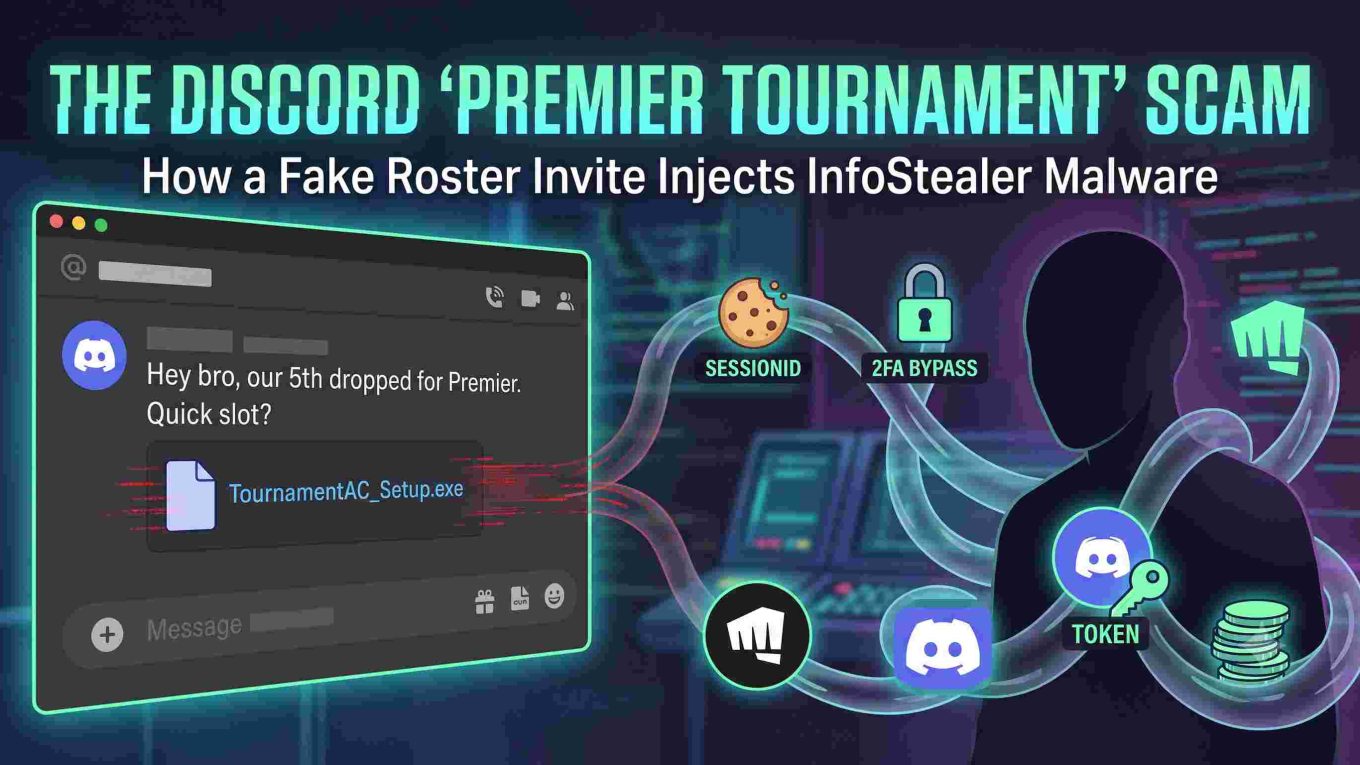
The Discord “Premier Tournament” Scam: How Fake Roster Invites Drop InfoStealer Malware
Author Note: Analysis based on recent threat intelligence, active phishing campaigns, and malware distribution logs observed across competitive tactical gaming communities.
Quick Answer: The Discord “Premier Tournament” scam uses hijacked user accounts to invite players to fake competitive matches. Victims are guided to phishing portals and tricked into downloading a fake “anti-cheat client,” “custom voice tool,” or
.scrconfig file. Executing the file deploys InfoStealers (like Lumma or RedLine) that bypass 2FA, steal browser session cookies, hijack Discord tokens, and compromise linked Riot Games and financial accounts.
Competitive tactical shooters thrive on team synergy, communication, and tournament play. In VALORANT, features like Premier mode and community scrims have made structured esports accessible to everyone. Cybercriminals actively exploit this competitive drive by deploying social engineering campaigns across Discord.
If a Discord contact—even a long-time friend—messages you asking to sub into a tournament roster and tells you to download external anti-cheat software, custom voice tools, or configuration files, do not click or run the file.
1. Anatomy of the Attack: The Social Engineering Funnel
This attack succeeds through psychological manipulation rather than direct software exploitation, abusing urgency and gaming culture norms to bypass natural skepticism.
[ Compromised Discord Account / Mutual Server Contact ]
                          │
                          ▼
  "Our 5th dropped out for Premier/scrims. Need 1 fast!"
                          │
                          ▼
  "Register on this tournament portal / log in via OAuth"
                          │
                          ▼
  "Download our custom league anti-cheat / comms patch (.zip/.exe/.scr)"
                          │
                          ▼
    [ Lumma / RedLine / Stealc Malware Executes Silently ]
                          │
                          ▼
  • Discord User Tokens Harvested
  • Active Browser Session Cookies Stolen (2FA Bypass)
  • Riot Games & Steam Session Data Extracted
  • Crypto Wallets & Password Vaults Scraped
Step 1: The Urgent Roster Pitch (The Hook)
Scammers reach out via direct messages or targeted server pings using hijacked friend accounts or convincing burner profiles:
- “Hey, our duelist disconnected right before our match lock. Can you sub in for one game?”
- “We’re playing in an amateur cash cup with a $500 prize pool, just need one verified ringer.”
Because the message often comes from an account on your friends list, standard defenses drop.
Step 2: Cloned Tournament Portals & Phishing Portals
Victims receive links to clean, professional-looking domains mimicking legitimate platforms like FACEIT, Challengermode, or Battlefy.
Common characteristics include:
- Cloned esports branding, sponsor graphics, and dynamic-looking bracket schedules.
- Fake “Login with Discord” or “Login with Riot ID” popups.
- Counterfeit OAuth interfaces that steal credentials or request elevated application permissions.
Step 3: The Malicious Payload (.zip, .exe, or .scr)
When the user tries to join the roster, the site triggers a simulated error:
- “Client mismatch: Download our tournament anti-cheat module to proceed.”
- “Custom voice communication client required for tournament server sync.”
- “Download roster config file (
Roster_Patch.scr) to confirm identity.”
The payload arrives as an executable archive (.zip, .rar) or disguised file formats (.exe, .scr, .bat) containing an InfoStealer payload.
2. Technical Breakdown: What Happens When the File Runs?
The delivered file is typically an InfoStealer—primarily strains such as Lumma Stealer, RedLine, Stealc, or Vidar. These lightweight binaries execute silently in seconds.
A. Session Cookie Hijacking (Pass-the-Cookie Attacks)
Multi-Factor Authentication (2FA) protects credentials in transit, but attackers bypass 2FA entirely by targeting active browser session cookies.
- The malware searches local storage directories across Chromium- and Gecko-based browsers (Chrome, Edge, Firefox, Brave, Opera).
- It extracts SQLite cookie databases containing valid session tokens for Google, Riot Games, Steam, Discord, and financial platforms.
- Attackers import these cookies into anti-detect browser environments, allowing them to browse directly into authenticated accounts without password prompts or 2FA checks.
B. Discord Token Exfiltration
InfoStealers extract Discord session tokens stored in %APPDATA%\discord\Local Storage\leveldb.
- Attackers use the token to automate API actions through your account.
- The hijacked account immediately broadcasts the same tournament scam links to all friend lists and shared servers, continuing the attack chain.
C. Gaming Client & Riot Credential Harvesting
The script scans config folders (%LOCALAPPDATA%\Riot Games\Riot Client\Data) to extract saved login profiles, Riot IDs, and hardware identifiers for sale on underground credential markets.
D. Crypto Wallet and Password Vault Scraping
The malware sweeps browser extensions and local storage for:
- Web3 browser extensions (MetaMask, Phantom, Coinbase Wallet).
- Unencrypted text files (
passwords.txt,keys.txt) on the Desktop or Downloads folders.
3. Red Flags: How to Spot the Scam Instantly
| Indicator | Legitimate Tournament | Malicious Scam |
| Software Requirements | Built-in Riot Vanguard or verified platforms (FACEIT, Challengermode) | Demands custom third-party .exe, .scr, or custom “anti-cheat patches” |
| Domain Authenticity | Established, official domains | Newly registered domains (.top, .xyz, .site, or typosquatted names) |
| Time Pressure | Structured brackets and registration windows | Aggressive panic framing (“Need you in 2 mins or we get disqualified!”) |
| File Delivery | Direct client integrations or browser dashboard | Direct download links, .zip archives, or Discord file attachments |
| Vanguard Handling | Vanguard runs alongside official play without external tampering | Claims you must disable Vanguard or add security exclusions |
4. Emergency Incident Response: What to Do If Compromised
If you executed a suspicious file, treat your operating system and active sessions as compromised. Follow this step-by-step containment protocol:
Phase 1: Immediate Network Isolation
- Cut the Connection: Unplug the Ethernet cable or disconnect from Wi-Fi immediately to cut off active Command-and-Control (C2) data exfiltration.
Phase 2: Session Invalidation (From a Secondary Clean Device)
Do not change passwords on the infected machine before cleaning it. Use a phone or secondary PC:
- Discord:
- Navigate to User Settings > Devices > Log Out All Known Devices.
- Change your password immediately to regenerate your authentication token.
- Enable an Authenticator App (TOTP) for 2FA.
- Riot Games / VALORANT:
- Log into Riot Account Management.
- Select Sign Out Everywhere, change your password, and verify Riot Mobile 2FA is active.
- Primary Email & Banking:
- Select “Sign out of all other sessions” inside your Google/Microsoft account security settings.
- Reset all primary account passwords.
Phase 3: System Remediation
- Offline Second-Opinion Scans: Boot Windows into Safe Mode and run offline scans using tools like Malwarebytes or HitmanPro.
- Clean OS Reinstallation: Because modern InfoStealers inject code into legitimate processes (such as
svchost.exe) and establish persistent hooks, the most reliable fix is a clean Windows reinstallation from a bootable USB drive.
Phase 4: Revoke Third-Party Permissions
- On a clean device, open Discord and go to User Settings > Authorized Apps. Revoke access for any unknown bots, tournament integrations, or external tools.
- Notify mutual gaming servers and friends that your account was compromised.
Read about other scams: Valorant Radianite Points System Scam Community Uproar; Need a 5th Esports Scam: How Fake Tournament Invites Steal Gamer Accounts; Cheap Valorant VP Scam; Valmay.top Scam; Is That Free Vandal Skin Cap? Dodging Valorant’s Most Sus Scams;
Frequently Asked Questions (FAQ)
Can Riot Vanguard protect my PC from downloading InfoStealer malware?
No. Riot Vanguard operates as a kernel-level anti-cheat designed to detect in-game memory injection, cheats, and unauthorized game modifications. It does not function as a general-purpose antivirus and will not block external infostealers you manually download and run.
Does changing my password stop an attacker using stolen session cookies?
Not always immediately. Changing your password updates your credentials, but active session cookies may remain valid until expired. To stop session hijacking, you must explicitly use the “Log Out All Devices” or “Sign Out Everywhere” option in your account security settings.
Why do scammers use .scr files for game scams?
Windows treats .scr files as executable screensavers. Because they run executable code just like .exe files, threat actors use the .scr extension to disguise malware as harmless tournament scripts or configuration files.
Can a compromised Discord account message people automatically?
Yes. Once an attacker extracts your Discord user token, they can use automated scripts to send direct messages to your entire friends list and post malicious tournament links in mutual servers without needing your password.